Chapter Six: The Access Audit
Operators, Pipelines, Aggregation & Compliance Queries
Previously
In Chapter Five you modelled level assignments and executed two types of promotion. Chapter Six puts the compliance team in the room — audit queries that answer the hard questions.
The Situation
The compliance team has arrived with a list of questions. Who has admin access to anything? Which contractors have write access? How many identities have access to the payment systems? Which grants expire in the next 30 days? Every question requires a different query technique.
Comparison Operators
Comparison operators filter results by value. They go in the match clause, on a separate line after binding the variable:
# All identities at L5 or above
match
$i has name $name;
$la isa level_assignment, links (assignee: $i, level: $l);
not { $la has end_date $_; };
$l has level_number $n;
$n >= 5;
fetch { "name": $name, "level": $n };
# Access grants expiring before a specific date
match
$i has name $name;
$s has name $sys;
$ag isa access_grant, links (grantee: $i, system: $s),
has end_datetime $vu;
$vu < 2024-02-15T00:00:00;
fetch { "identity": $name, "system": $sys, "expires": $vu };|
💡 This query may return no results — that’s expected
This query only returns results if you have access grants with an end_datetime set. If you completed the bonus in Chapter Four’s challenge, you will have one. If not, add an end_datetime to one of your existing grants first: |
Who Has Admin Access?
match
$i has name $name;
$s has name $sys;
$_ isa access_grant, links (grantee: $i, system: $s),
  has permission_level "admin";
fetch { "name": $name, "system": $sys };
An Audit Finding — the Over-Privileged Bot
The admin query returns two rows: Sam Rivera — expected — and CI Deploy Bot. That second row is a problem. A deployment bot needs to push artifacts: write access. Nobody reviewed the grant, and it went in as admin.
This is exactly what access audits exist to catch. And notice that the query needed nothing special to catch it: the bot has a name like every other identity, so the same sweep that audits the humans audits the machines.
Who answers for the finding? Recall that every access_grant has a grantor:
match
$sa isa service_account, has name "CI Deploy Bot";
$s has name $sys;
$_ isa access_grant, links (grantee: $sa, system: $s, grantor: $g),
  has permission_level $pl;
fetch { "service_account": $sa.name, "system": $sys, "permission": $pl, "grantor": $g.name };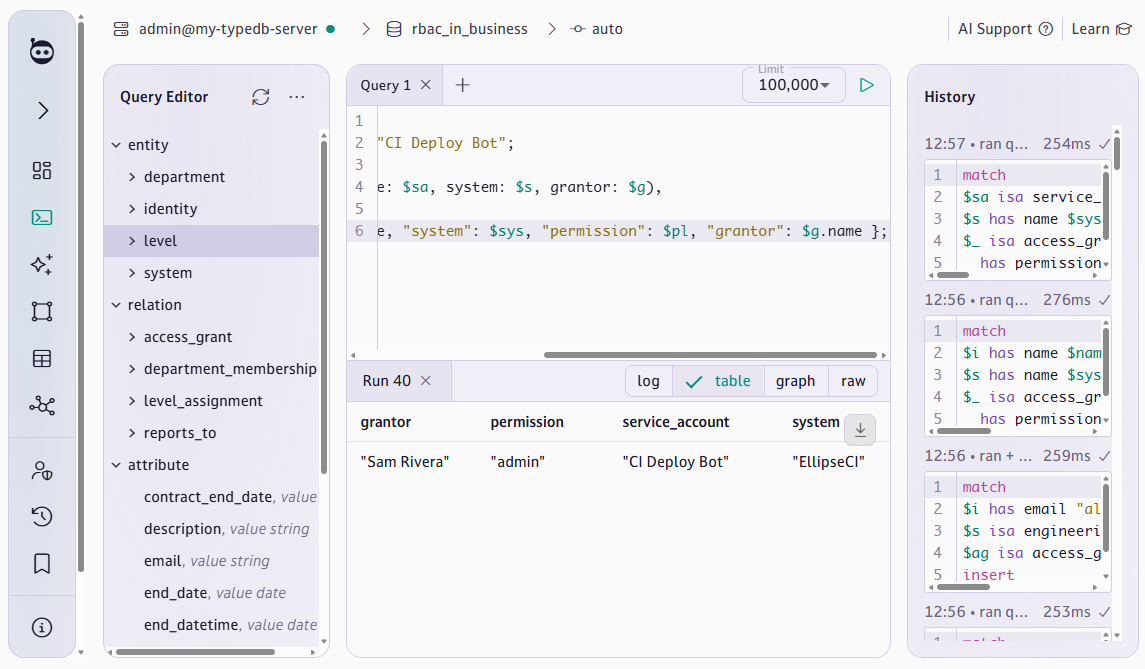
One row: CI Deploy Bot, admin on EllipseCI, access granted by Sam. The finding lands on Sam’s desk with a note from Michelle Rocksmasher: your bot has excess credentials, and it just failed our audit. We’ll fix it by revoking the admin grant without destroying its history in Chapter Nine.
Which Temporary Staff Have Write or Admin Access?
match
$i isa temporary_staff, has name $name;
$s has name $sys;
$_ isa access_grant, links (grantee: $i, system: $s),
  has permission_level $pl;
{ $pl == "write"; } or { $pl == "admin"; };
fetch { "name": $name, "system": $sys, "permission": $pl };|
💡 This query may return no results — that’s expected
Alex was promoted from contractor to full-time employee in Chapter Three. Unless you inserted additional contractors or interns and granted them write or admin access, this query will return no results. That is correct — it means Amasoft currently has no temporary staff with elevated access, which is good. To test the query, insert a new contractor and grant them write access, then run it again. |
|
💡 Disjunction — OR conditions
The |
What Type of Identity Has Access to Payments?
The compliance team wants to know the categorisation of each identity with access to payment systems:
match
$i isa! $type;
$s isa payments_system, has name $sys;
$_ isa access_grant, links (grantee: $i, system: $s);
$i has name $name;
fetch { "name": $name, "identity_type": label($type), "system": $sys };
Only the CISO, Michelle Rocksmasher, has access. This is correct.
The isa! ("direct isa") keyword returns only each grantee’s most specific type — contractor, intern, full_time_employee, and so on.
Aggregation — The Numbers
Count access grants by permission level:
match
$ag isa access_grant, has permission_level $pl;
reduce $count = count($ag) groupby $pl;
fetch { "permission": $pl, "count": $count };
Average level across all employees, grouped by department:
match
$e isa permanent_staff, has name $name;
$d isa department, has name $dept;
$_ isa department_membership, links (department: $d, member: $e);
$la isa level_assignment, links (assignee: $e, level: $l);
not { $la has end_date $_; };
$l has level_number $n;
reduce $avg = mean($n) groupby $dept;
fetch { "department": $dept, "avg_level": $avg };|
💡 A query this schema can’t answer yet — and how to fix it
A natural compliance question is: 'who has access to systems outside their department’s ownership?' For example, does anyone in Engineering have admin access to the payments system, which Finance owns? This query isn’t possible with the current schema because systems and departments aren’t connected. A system_ownership relation would fix it: |
Pipeline Ordering — sort, limit, fetch
Find the top 5 most privileged identities by number of admin access grants:
match
$i has name $name;
$ag isa access_grant, links (grantee: $i),
  has permission_level "admin";
reduce $count = count($ag) groupby $name;
sort $count desc;
limit 5;
fetch { "name": $name, "admin_grants": $count };|
⚠️ fetch must always be last
|
Debugging Queries That Return Nothing
When a query returns nothing unexpectedly, work from broad to narrow:
-
Remove all filters — does any data come back?
-
Add conditions one at a time until results disappear — that last condition is the problem.
-
Check: wrong type (matched 'permanent_staff' but instance is 'intern'), wrong role name, case mismatch, pipeline order.
Chapter Six Challenge
|
🎯 Challenge: The Compliance Report
Answer all six compliance questions with TypeQL queries:
|