Chapter Five: Levels & Promotions
Level Assignment & Two Organisational Changes
Previously
In Chapter Four you defined the access model and granted access to Amasoft’s systems. Chapter Five introduces seniority levels - how to model them, how to assign them, and how to handle two different kinds of change that promotions can involve.
The Situation
Amasoft uses a seniority scale from L0 to L7. Managers sit at L4 and L5; directors and executives at L6 and L7. Alex has already been promoted to full-time employee in Chapter Three. Now we assign seniority levels - and Sam Rivera gets promoted from L4 to L5.
Level as an Entity
A level at Amasoft is not just a number - it is a rung on the career ladder, with an identity of its own: L5, for example, is "Senior Manager".
A person’s level, however, changes over time, with history that must be preserved - so the assignment is a relation connecting a person to a rung, owning the dates it was active:
define
attribute level_number, value integer @range(0..7);
entity level,
  owns level_number @key,
  owns name @card(1);
attribute end_date, value date;
relation level_assignment,
  relates assignee @card(1),
  relates level @card(1),
  owns start_date @card(1),
  owns end_date @card(0..1);
entity staff, plays level_assignment:assignee;
entity level, plays level_assignment:level;
@range(0..7) on level_number means TypeDB rejects any value outside this range at insert time. @card on start_date and end_date means level assignments must all have exactly one start_date, and may optionally have one end_date. Insert the level instances:
insert
$_ isa level, has level_number 0, has name "Trainee";
$_ isa level, has level_number 1, has name "Junior Associate";
$_ isa level, has level_number 2, has name "Associate";
$_ isa level, has level_number 3, has name "Senior Associate";
$_ isa level, has level_number 4, has name "Manager";
$_ isa level, has level_number 5, has name "Senior Manager";
$_ isa level, has level_number 6, has name "Director";
$_ isa level, has level_number 7, has name "Executive";|
🗺️ Check the Data Explorer now
Go to the Data page in TypeDB Studio, and select 'level' from the schema view. You should see all levels as table rows, listing the level numbers and names. |
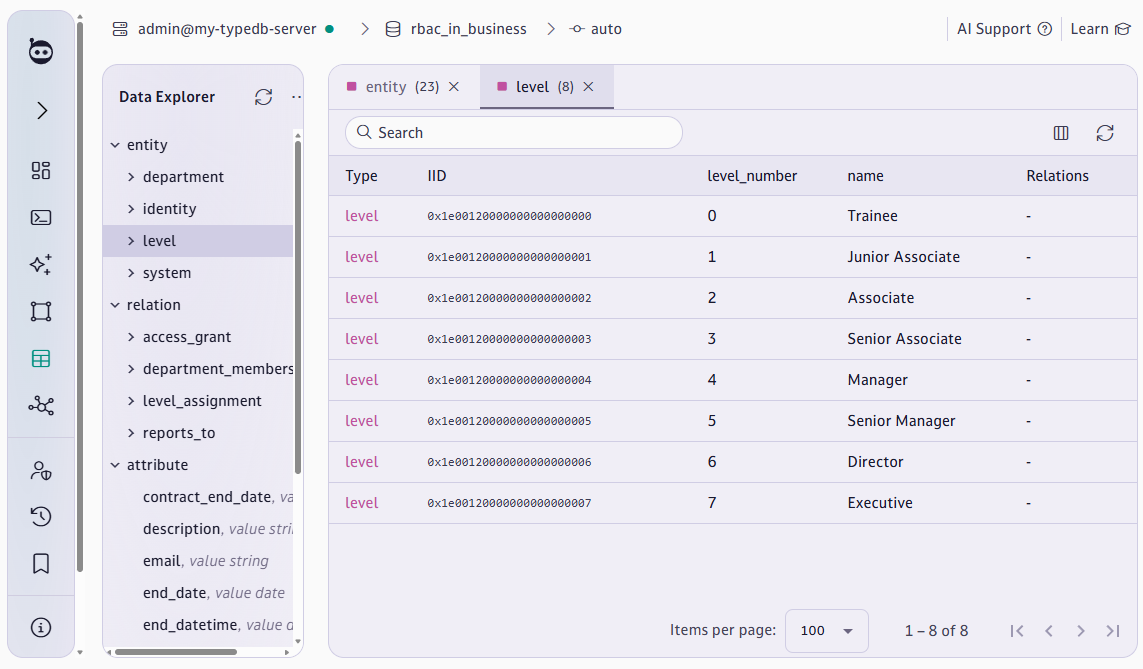
Return to the Query page. Assign Alex to L2 (their new level as a full-time employee), Sam to L4, and Michelle to L7:
match
$alex isa full_time_employee, has email "alex.chen@amasoft.com";
$l2 isa level, has level_number 2;
put
$_ isa level_assignment, links (assignee: $alex, level: $l2),
  has start_date 2024-07-08;
end;
match
$sam isa full_time_employee, has email "sam.rivera@amasoft.com";
$l4 isa level, has level_number 4;
put
$_ isa level_assignment, links (assignee: $sam, level: $l4),
  has start_date 2022-06-01;
end;
match
$michelle isa full_time_employee, has email "michelle.rocksmasher@amasoft.com";
$l7 isa level, has level_number 7;
put
$_ isa level_assignment, links (assignee: $michelle, level: $l7),
  has start_date 2020-01-01;
end;|
⚠️ If a query returns 0 rows
A successful write query that reports 'Total rows: 0' always means the match clause found nothing — not that the insert failed silently. Check two things:
If either returns nothing, that is why the insert produced 0 rows. |
|
⭐ TypeDB Advantage: Level history preserved as data
In SQL, history is lost unless you build a separate audit table. In TypeDB, each |
Sam’s Promotion — Level Change (L4 → L5)
Sam is being promoted to L5. This does not change Sam’s type — Sam is still a full-time employee. It only changes the level_assignment relation. This is non-destructive:
# Close the old level assignment
match
$sam isa full_time_employee, has email "sam.rivera@amasoft.com";
$la isa level_assignment, links (assignee: $sam);
insert
$la has end_date 2024-06-30;
# Open the new level assignment
match
$sam isa full_time_employee, has email "sam.rivera@amasoft.com";
$l5 isa level, has level_number 5;
put
$_ isa level_assignment, links (assignee: $sam, level: $l5),
has start_date 2024-07-01;|
🗺️ Check the Graph Explorer now
Go to the Graph page in TypeDB Studio, and click 'level-assignment' from the schema view. You should see all level assignments as individual nodes. Click on a node. In the Explorer pane (right), go to "Display attribute" and choose You will now see a graph of every employee at Amasoft and their full level assignment history! |
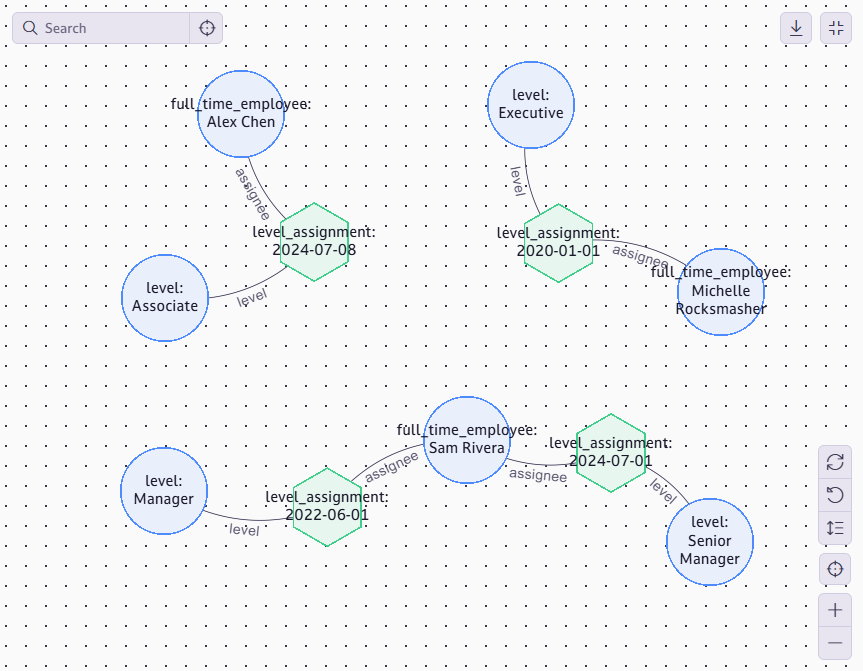
|
💡 The 'links' keyword
When binding both a relation’s participant and the relation itself to variables, use the |
|
🏢 Type change vs. data change
Type change (contractor → full_time_employee): destructive. Occurred in Chapter Three when Alex was promoted. Required deleting all relations first, then deleting the identity, then reinserting. Level change (L4 → L5): straightforward. Close the old assignment with In general, you want to design schema such that entities don’t regularly change into different types. However, we will keep this sample schema simple. |
Querying Across the Hierarchy
Query for all employees at L4 and L5 and their current level:
match
$i isa permanent_staff, has name $name;
$la isa level_assignment, links (assignee: $i, level: $l);
not { $la has end_date $_; };
$l has level_number $n;
{ $n == 4; } or { $n == 5; };
fetch { "name": $name, "level": $n };
Here we use or to match based on two possible criteria (level is 4 or 5). The not { $la has end_date $_; } pattern filters to only assignments without a closing date. Because we only ever set end_date when reassigning someone’s level, that is sufficient here.
|
⭐ TypeDB Advantage: Polymorphic queries across a hierarchy
Querying for all 'permanent_staff' instances automatically includes full_time_employee and part_time_employee. In SQL, this requires UNION ALL across multiple tables or a discriminator column. In TypeDB, the hierarchy is enforced by the schema and resolved at query time. |
Chapter Five Challenge
|
🎯 Challenge: Levels and Promotions
|