Chapter One: The Identity Registry
Entities, Attributes & Your First Schema
The Situation
Before you can manage access, you need to know who exists. The first entry in Amasoft’s new system will be a staff member — anyone who works at Amasoft. Not a complex hierarchy — just a single entity type with an identifying attribute. We’ll build from there.
Creating an Entity
In TypeDB, every type falls into one of three kinds: entity, relation, or attribute. A staff member is an entity — a thing that exists independently. Here is the simplest possible schema:
define
entity staff;
Let’s run this query in TypeDB Studio now:
-
Navigate to the TypeQL query editor page
-
Type or paste the query into the query editor
-
Click the Run button (▶) in the editor, or press kbd:[Cmd+Enter] on Mac / kbd:[Ctrl+Enter] on Windows
-
Watch the log panel at the bottom of the screen
A successful query looks like this in the log:
## Running>

## Result> Success
If something goes wrong, the log shows an error with a code and description. The error messages in TypeDB are generally informative — read them carefully before assuming the query is wrong. The most common causes are covered in the debugging section of Chapter Six.
|
⚠️ TypeQL is case-sensitive
TypeQL keywords are written in lowercase. 'Define' will fail. 'define' will succeed. 'Insert' will fail. 'insert' will succeed. If Studio shows a red error, check capitalisation — it is an easy mistake to make. |
You have just told the system: staff exist. But a staff member with no properties is an empty record. Let’s give them something to identify them.
Adding an Attribute
Attributes are values that describe an entity. Every staff member at Amasoft has a unique email address — their identifier in the system. Let’s define that:
define
attribute email, value string;
entity staff,
  owns email @key;
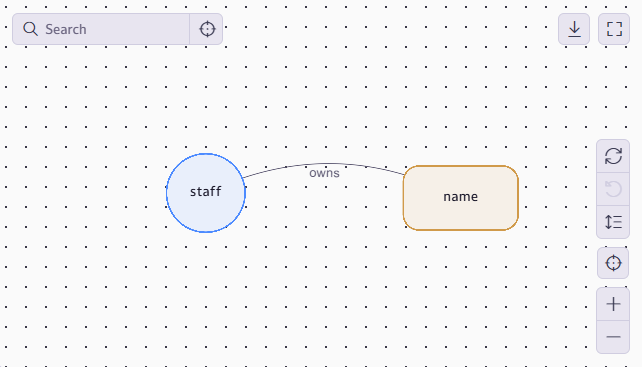
The keyword owns declares that a staff member may have an email. @key enforces existence and uniqueness: each staff member must have an email address, and no two staff members may share the same email address. TypeDB rejects any insert that would violate these constraints.
The keyword value string says this attribute holds text. TypeDB supports string, integer, double, boolean, date, datetime, duration, and more. You can find the full list of supported attribute value types at Value types.
|
🗺️ Check the schema visualiser
After running a define query, you can visualise your schema using the Schema page in TypeDB Studio. You’ll see your entity types as nodes and their attributes as connected leaves. |
The @key and @card annotations
You’ve already seen @key in action. It declares that an attribute must be present and unique within its type — every instance must have a value, no two instances can share the same value. TypeDB enforces this at the database level.
In fact, @key is shorthand for a combination of two finer-grained annotations: @card(1), which requires exactly one value to exist, and @unique, which forbids two instances from sharing one. We’ll use @card heavily throughout this guide - without @card or @key, you could have 0 values, or 1 value, or 10 values - any number of values. This is a powerful tool, but with great power comes great responsibility - it’s good to keep schema strict for the maximum possible guarantees of data integrity.
|
💡 Redefining an existing type
Running define on a type that already exists adds to it — it doesn’t replace it. This will become important once you start inserting data in Chapter Three. Defining constraints on existing instances will trigger validation to ensure compliance with the new logic. For example, it will reject adding |
A Second Entity — Departments
Departments also exist independently of who is in them. Let’s define a department entity. We’ll mark it @abstract — meaning it can never be inserted directly, only through concrete subtypes like Engineering or Finance. Defining those subtypes is a job we’re setting aside for Chapter Three:
define
attribute name, value string;
entity department @abstract,
  owns name @key;
Notice @abstract on department. You can never insert a plain 'department' — only a concrete subtype. But querying for all 'department' instances returns every subtype automatically. The abstract type is a shared foundation, not a thing that exists on its own.
|
💡 Attributes are globally scoped
An attribute type belongs to the schema. This means that rather than having multiple attribute types called "email" throughout the database, there’s only one, which can then be attached anywhere. Here, "email" is attached to 'staff' but it could also be attached to 'department'. Then, extracting all emails from the DB becomes easy and robust. |
Chapter One Challenge
|
🎯 Challenge: Open the Staff Registry
|
What You Can Do Now
You can now define entities and attributes, enforce existence and uniqueness with @key, and use @abstract to create foundation types that can never be directly instantiated. Chapter Two builds the full identity hierarchy on top of this foundation — introducing type hierarchies, the full range of staff types, and the relations that connect them.